29 Oct 2012

iPad mini review


Hands on: iPad mini review
The new iPad mini makes its debut


Getting hands-on with the iPad mini could just as easily be called a "hand-on" since it's so easy to hold one-handed, and tap with the other.

The first thing you notice when you pick it up is just how thin and light it is. With a smooth aluminium back, you feel like you could flip it like a coin, or spin it on your palm.

It's as thin as a pencil and as light as an A4-size pad of paper, giving it a really impressively light feel in the hand, much like the iPhone 5.


You can grip the iPad mini with a couple of fingers on the bottom, or even stretch your hand across the back like you're holding an iPhone 5 or iPod touch. It's 5.3 inches (13.5 centimeters) wide, and feels nicely balanced at 7.87 inches (20cm) high.

It's just 308 grams for the Wi-Fi option, but slightly heavier at 312 grams if you opt for the LTE version. We were so tempted to just start flipping it in the air like a pancake, that's how light it feels. This makes it even better as an e-reader than the larger iPad models, since you can hold the iPad mini in one hand for much longer before feeling fatigued.

The aluminum back meets the glass front at a super-shiny, diamond-polished chamfer reminiscent of the one on the new iPhone. The white version is stunning, with a matte silver back, and the black version's charcoal aluminum back matches the black iPhone 5 perfectly.
The iPad mini has an 4:3 aspect ratio, different than the 16:9 ratio preferred by the Google Nexus 7 and Amazon Kindle Fire HD. The wider screen (holding it in portrait orientation) gives you more room for content.

Apple's Phil Schiller gleefully compared the iPad mini's 7.9-inch screen to the Nexus 7's 7-inch screen, pointing out how the iPad mini's viewing area is 40 per cent larger when you hold it in portrait, and a whopping 67 per cent larger in landscape orientation.

The iPad mini's 1024x768-pixel screen is 163 pixels per inch, the same pixel density as an iPhone 3GS, making it woefully low-res in terms of specs. It's also the same pixel dimensions as iPad 2 and the original iPad, so all of the existing iPad apps can run natively, no scaling or waiting for developers to push out updates.

In our testing, we noticed that typing on the smaller onscreen buttons and keys will take a bit of getting used to. They're smaller than on the large iPad, of course, but still tappable.

The buttons you're aiming at aren't any smaller than they'd be on an iPhone or iPod touch, but since they appear on a larger screen than either of those devices have, they feel even smaller.

Everything down to the app icons on the Home screen are smaller than on the big iPad, even as they float in a 4x5 grid with generous space around them.
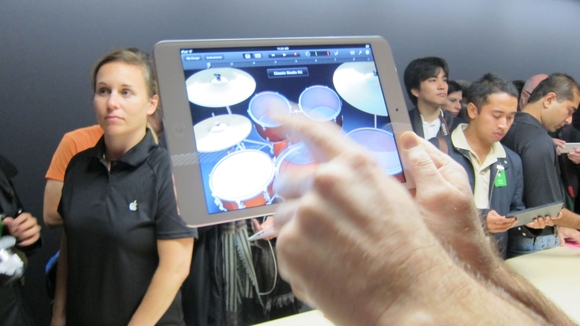
At one point, an Apple rep demonstrating the iPad mini had to try a few times to hit a Back button at the top-left of the interface, but to be fair, he was holding the iPad mini a fair distance from his body so journalists could see and photograph him using it.

The thin bezels on either side of the screen (when held in portrait) give you enough of an area to grip while still minimizing how far your fingers will have to stretch to reach the screen's edges. The screen is bright and bold, with deep blacks and sharp text although it's not quite Retina quality.

We tested the front camera's 720p FaceTime calling over Wi-Fi to see if looked much sharper than on an iPad 2. (The front camera also takes 1.2-megapixel stills, and the rear camera takes 5-megapixel stills and records 1080p video.)

The call streamed without lag and we could even hear each other over the crowd noise, but due to the poor lighting, the image still looked grainy, not like the glamour shots Apple uses in its advertising.

The iPad mini we played with was Wi-Fi only - like its bigger sibling as well as the iPhone 5 and new iPod touch, it has dual-band 802.11n at 2.4GHz and 5GHz, plus Bluetooth 4.0. The LTE version (£100 extra) will work with 20 carriers around the world.

Its dual-core A5 chip might be the same as in the £329 iPad 2 (introduced in 2011 and still on sale) although it's possible Apple added more RAM, since the iPad mini supports Siri, and the iPad 2 (which has 512MB of RAM) doesn't.
Naturally, the small iPad mini sports Apple's new Lightning connector, which can be inserted facing either direction and locks into place with a satisfying click. Apple's Lightning adaptors will let you connect a VGA display or projector, a digital display or projector with HDMI, a USB camera, or an SD card (but will cost you at least £25), and Apple also offers a £25 Lightning to 30-pin adaptor and spare Lightning to USB cables for £15 (one cable comes with the iPad mini).

Preorders begin this October 26. iPad mini starts at £269 for 16GB Wi-Fi only. 32GB and 64GB versions are £349 and £429, and you can add LTE cellular for £100 extra.

Here's where consumers might have a problem though - for £150 less, they'll be able to pick up a Google Nexus 7 or Amazon Kindle Fire HD with 32GB of storage, a much faster processor and a more impressive screen.

Apple has made some significant sacrifices for the iPad mini, be it the low-res screen or last-gen processor, and while it will still sell thanks to its user 'enchantment', the rivals are better-specified, cheaper and carry some pretty serious names behind them.

Wi-Fi versions of the iPad mini start shipping November 2, and the LTE versions two weeks later. Its size and weight let it compete with smaller e-readers, while its power and access to the full ecosystem of iPad apps make it a capable, extremely portable tablet, too.


Early verdict

The smaller touch targets take some getting used to on the iPad mini, although they're not any smaller than on an iPhone - but then again, this is a tablet. What's more, £269 for the 16GB Wi-Fi only version is significantly more than the 16GB Kindle Fire HD (£159), or 16GB Google Nexus 7 (£199).

However, the iPad mini runs native apps, has a whopping 10 hours of battery life, and is extremely light and portable. It's also comfortable to hold for long periods of time and won't lead to wrist fatigue when you're watching a movie.

The 4:3 aspect ratio also allows you to fit more on the screen when you're reading or surfing the web, which is a boon for 7.9-inch tablet fans. We're sure this will outsell the competition simply because it's an Apple product, but ultimately the brand has once again squeezed out the lowest spec it can manage on the device to get it down to a relatively competitive price point.

18 Oct 2012

Nokia and JBL make a perfect noise

The story behind the collaboration between Nokia and audio experts JBL
It is no coincidence that the JBL PowerUp speaker, with NFC and wireless charging, is the perfect companion for Nokia’s new Lumia 920 smartphone.

Neither is it a matter of luck that the speaker and the smartphone both share a similar design language and colour aesthetic.

The speaker is, in fact, the result of Nokia’s technical innovation in smartphones and design heritage combined with JBL’s audio expertise.

The JBL PowerUp is joined in the line up with the JBL PlayUp speaker, a portable and wireless speaker that is also Bluetooth and NFC-enabled.

Together, these two speakers offer Nokia Lumia owners a seamless choice of audio accessories that they know will not only sound great and look fantastic, but also work alongside their smartphones as well.
Partners in sound

Lasse Lautsuo, Head of Gear product marketing at Nokia, told Conversations about the seeds of the relationship with JBL.

“We learnt as we worked with Monster [on a range of headphones] that we can create different and interesting products with brands that consumers appreciate but in areas that you wouldn’t necessarily associate with Nokia,” says Lasse.

Nokia wanted to work with a company to create new and exciting audio products and JBL was a perfect fit.

“JBL had the combination of being a cool and
youthful brand but they also had the heritage of
audio expertise in high end speakers for
public and professional use.”


“So after we had launched the Monster partnership it was logical from the music side to start making better speakers.”

Design

The speakers were made in close collaboration between the two companies, however they clearly follow Nokia’s design story.

Nokia was also able to embed much of the functionality, such as the ability to charge your Lumia 920 or Lumia 820 (with the recharging shell) on the PowerUp speaker without the need for any wires. You just place it on top.


JBL’s role was to manufacture the speakers, with their knowledge of the best components and make them sound as good as possible.

So, although it is not branded as a Nokia product on the box, much of the design work, including the design language and colours, is very much of Nokia’s choosing.

“We wanted to continue to bring out products that capture the eye,” says Lasse.

“We cherish the colour range that the Nokia Lumia has for the phones as well as the accessories.”

Nokia fans will probably recognise that the PlayUp speaker shares much of its DNA with the Nokia Play 360 speaker. This has been made from double-shot plastic, which gives the body durability, a two-tone look and the transparency of the outer layer helps to maximise the colour effect.

As you would expect of any product that is associated with Nokia, they look great and have a fantastic feel to them.


Offering consumer choice

Although Nokia has got this successful partnership with JBL, and several others, such as Monster and Virgin Atlantic, they would still welcome other manufacturers to join in as well.

“I am sure that all of us in the Windows Phone ecosystem would be really happy to see a vibrant ecosystem where we see various brands making different accessories,” says Lasse.

After all, with NFC and the Qi wireless charging standard, it is not just Nokia smartphones that can take advantage of these beautiful speakers.

By going with JBL, though, Nokia has ensured that there are accessories available already and also demonstrated that there is still the scope to re-imagine something as common as a speaker.

“We want the accessories to show the consumers and other   companies that you can really innovate and differentiate.”


“I believe we have done that with the wireless charging integrated into a more traditional accessory like a speaker or something cool like the proximity sensor that lights up when the device lands on it.”

For now, though Nokia can celebrate the fact that using their mobile expertise and design flair they have worked with JBL to produce two speakers that are worthy of the Lumia smartphones.


15 Oct 2012

Download avast Free Antivirus 7.0.1474 beta

avast! Free Antivirus 7.0.1474 Beta


Download    [ avast! Free Antivirus 7.0.1474 ]

Download    [ avast! Free Antivirus 7.0.1474 Beta ]
Download    [ avast! Virus Definitions ]
Download    Avast 6 and 7 license key untill 2038 


avast! Free Antivirus 7 is a full-featured antivirus package designed exclusively for home users, non-commercial users. Both conditions should be met!


ALWIL Software a.s. offers avast! Home Edition free of charge, since in their opinion, it is possible to avoid global virus spreading by efficient prevention; however, many user are not able or do not want to pay for antivirus software. This page will show you the most important features of this program.

Features of avast! Home Edition 7.0 :

· Antivirus kernel
· Automatic updates
· Simple User Interface
· Virus Chest
· Resident protection
· System integration

What's New in avast! Free Antivirus 7.0.1474 :

· Fixed "Black screen" syndrome
· Fixed crashes in IE WebRep module
· Fixed random switching to the Safezone
· Improved stability & performance of Outlook plugin
· Double VPS update sounds
· Fixed SNX issues
· Fixed some BSODs
· Fixed some leaks

Samsung to launch Galaxy S3 Mini

        Samsung aims to take on Apple’s iPhone 5 with a new 4in version of the Galaxy S III smartphone. 


Samsung plans to unveil a smaller "mini" version of its popular Galaxy S3 flagship smartphone with a 4in screen in Europe on Thursday, heightening its competition against Apple's new iPhone 5, released last month.


Apple made much in its launch of the iPhone 5 of its longer screen, which measures 4in diagonally, compared to the 3.5in of previous generations.


But now Samsung is aiming for the same market by adding a smaller version of the 4.8in Galaxy S3, which was unveiled in late May.


"There's a lot of demand for a 4in screen device in Europe. Some call it an entry-level device, but we call it 'mini.'," said JK Shin, head of mobile communications, at a press conference in Seoul, Samsung's world headquarters.


There had been widespread speculation that Samsung would launch a stripped-down version of the high-end Galaxy S3 to expand its market share in the mid- to low-end smartphone business. It is already the world's largest supplier of smartphones by analyst estimates, although it has not released formally audited figures since the end of 2011.


Samsung said on Wednesday the Galaxy S3 Mini would not be an entry-level model. Samsung UK declined to comment ahead of the formal launch.


Samsung is beefing up its product line-up with such devices as the latest phone-tablet Galaxy Note 2, as well as ATIV smartphones that run on Microsoft's new Windows Phone 8 system to compete with Nokia's Lumia series.


Samsung plans to introduce its first ATIV Windows 8 tablet next month, and ATIV S smartphone in November.


• Separately, South Korean news agency Yonhap quoted Shin as saying that Samsung did not plan to use its 4G LTE patents to attack its rivals, suggesting it was not considering expanding its legal battle with Apple to 4G technologies. However at the end of September Samsung filed a note in a US court indicating it would add the iPhone 5 to a list of alleged patent-infringing products – though those patents may not include 4G.


Samsung is under investigation by the European Commission and international bodies over its use of "standards-essential" patents for technologies such as 3G in court cases against Apple: such patents are required to be licensed to all comers who are prepared to pay a universal fee.


13 Oct 2012

google gravity-trick

If you want to show that your  google search page without gravity.


Go to your google search page

And search the keyword google gravity and select the first result.wait some time you see your google page without gravity.


and also the results are without gravity as shown below.


How to Change the Local Drive Icon with any Picture

How to create an Icon File of your image and use it as  drive icon


To create a .ico file of your image, follow the steps mentioned below

1. First create a 16 X 16 image file containing only your face.

2. Head over to this website and click the browse button to upload your image. Next click            “convert to ICO”  to get an icon of the image.


                                                             OR

                                 download icon converter software from here

3. Now you need to create an autorun.inf file and place the icon and the autorun.inf in your          drive

      We assume that the name of your icon file is myicon.ico

4. Open notepad and copy the following lines exactly

   [AutoRun]
  Icon=myicon.ico


   save it as autorun.inf to your drive which you wish to change the icon.

5. Copy the  myicon.ico files in 
your drive which you wish to change the icon.

6. Hide both the files in  drive so that you don’t delete them accidentally. Now restart your  computer. You will see your image as the drive icon as shown below


The icon is also shown on the auto play options as well as on the windows explorer. This trick

works in any computer as long as you keep both the files in the root of your  drive.This is also works in removable drives like pendrive 

this is done in any drive or folder to change icon of that..

11 Oct 2012

President of the United States of America 2012 Morgansbyers


Microsoft Security Essentials 4.1 on Windows 8


 According to Wikipedia, Microsoft Security Essentials does not run on Windows 8, which  has an  antimalware subsystem of its own. Guess what, they’re wrong!


Official Microsoft Installer:

Microsoft Security Essentials 4.1.204.0 Prerelease for Windows 7 (x64): link
Microsoft Security Essentials 4.1.204.0 Prerelease for Windows 7 (x86): link

Unofficial First Ever Installer:

Microsoft Security Essentials 4.1.204.0 Prerelease for Windows 8 (x64): link
Microsoft Security Essentials 4.1.204.0 Prerelease for Windows 8 (x86): link

Unofficial First Ever Uninstaller:

Microsoft Security Essentials 4.1.204.0 Prerelease for Windows 8 (x64): link
Microsoft Security Essentials 4.1.204.0 Prerelease for Windows 8 (x86): link


                This is not an official updater! The author is not responsible for any damages 
                 this mod may cause to your system. Working only on Windows 8 Release Preview!
  1. Microsoft Security Essentials 4.1.204.0 on Windows 8 – Install Guide.
  2.Download Microsoft Security Essentials 4.0.1512.0 Beta x64 or x86.
     
  3.Install MSE on Windows 8 using Compatibility Mode (Windows 7).

  4.Download and run unofficial updater: MSE 4.1.204.0 for Windows 8          Release Preview build 8400 x64 or x86.

  5.Run Microsoft Security Essentials – done!
    You can find old version of MSE in Windows Update – hide this
    updates,because you can not install it!
This does not affect the Antivirus and Antispyware definition update!


Microsoft Security Essentials 4.1.204.0 on Windows 8 – Uninstall Guide.

                            1.   Microsoft Security Essentials 4.1.204.0 can’t be uninstalled in ordinary way,
          you can uninstall it with unofficial uninstaller from First Ever!


    2.    Download and run unofficial uninstaller: MSE 4.1.204.0 for  Windows 8 Release Preview                             build 8400  x64 or x86.
   3.    Go to Control Panel -> “Programs” -> “Program and Features” and uninstall                                                  (remove)Microsoft  Security Essentials, confirm with          “Yes” button – done!
   4.    You should be able to run MSE 4.0.1512.0 Beta (based installer) without any errors!

          Please register on my website and if you have any questions, feel free to leave a comment!